

When I’m working on an author website design for an author with multiple books, one of the first things I consider is how to introduce them through their website — whether they’re a household name or not. No matter if your site visitors are experiencing your website on a phone or a larger display, the first thing they see should orient them to what you write about and who you write it for. On top of that, it should also create a great first impression. The visual design should reflect your author persona and genre, ensuring that it feels cohesive and professional.
For some authors it can be pretty straightforward. For example, if you write paranormal romance, most folks have some idea of what that means so you don’t have to go into much detail. For other authors you have to elaborate a bit. For example, “I’m an educator and speaker who writes about anxiety and the mental health crisis facing teens.”
One of the best ways you can do this is by creating a header on your website’s landing page. A website header for authors might take multiple forms (examples to follow), but it should always communicate in text and visual design what the website (and therefore the author) is about quickly.
The visual design immediately communicates the tone for your brand. It should reflect the genre you write in and appeal to your target audience. Visual elements can evoke emotions that align with the themes or feelings in your writing. The right visuals also create a stronger emotional connection between the visitor and your content. A good design will guide visitors’ eyes to the most important elements — like a newly released book or a CTA for signing up to your newsletter — without overwhelming them. By leveraging a header, you create a visual hierarchy that helps you prioritize which parts of your website get attention first.
Here are the key elements to include in your author website header design:
- Author Name/Branding: Your name or pen name should be prominently displayed. You may also include a logo if you have one (more info about that here).
- Tagline or Intro: A concise description of your writing style, genre, or a unique element about you. For example: “Bestselling Mystery Novelist” or “Fantasy Author with a Twist.”
- Navigation Menu: Easy-to-use navigation that links to the website’s primary pages.
- Social Media Icons: Links to your active social media platforms (such as Instagram) allowing readers to follow and engage with you.
- Call to Action (CTA): A button or link to encourage key actions, like “Buy Now” or “Learn More”
Examples:
Our first example is for a fictional author who doesn’t need more than the genre name to communicate the kind of books that they write. They also have a design that feels personal with a hero photo of themselves, and a handwriting font for their name. Immediately following this website header you might place information about a latest book, or an email signup. A nice feature of this design approach is that it is sustainable over many book release cycles without many (if any) changes.

Overall, your author introduction should reflect your personality and the tone of your work, aiming to engage your readers right from the start. This second example is for an author who needs a bit more introduction, and also has had success with previous books. Like the last example, the design is simple and striking, and doesn’t need to be updated much as new books are released.

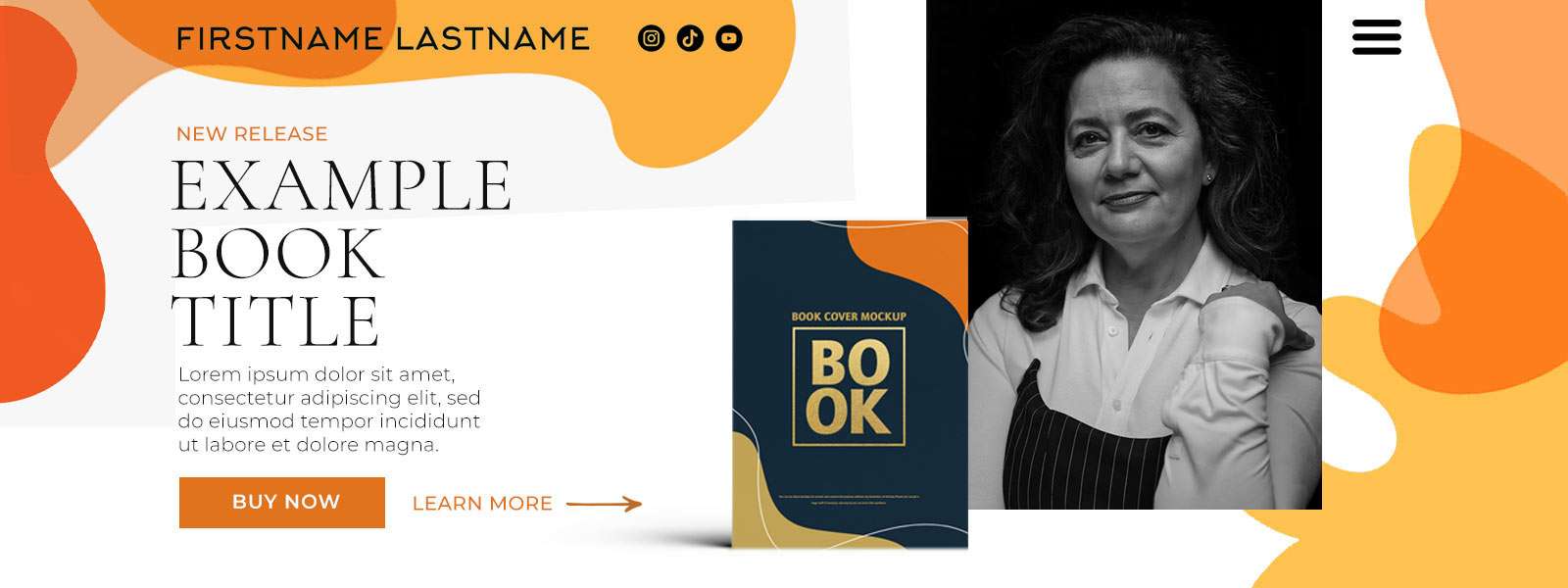
When an author has a series of books that have been popular, it is less important to go into detail and more important to promote the most recent in the series. Often the title and tagline of the book is easily visible from the cover image, and making it relatively large means it’s easily understood. This kind of author website header gives the author a model they can use the add additional books in the future as they are released without having to rethink their entire website design.

When an author wears multiple hats — maybe they’re a speaker, a journalist, and author, and a podcaster — creating a strong brand for the author’s expertise means that visual language can be used in all their collateral to help communicate what they do and for whom. In this example, you can see that visual design quickly communicates characteristics like professionalism, joyfulness, approachability, and countless others. When it’s time to promote a latest book release, the book’s information can be placed right up front inside of the large brand design.
This last example utilizes dynamic photography to demonstrate expertise and connection about the author’s chosen topic. While this is less focused on branding a particular book, often an author is really branding themselves and leveraging one or more books as one of the ways they communicate with their audience. In these cases the author’s social media presence is often critical, and many times an email newsletter is critical too. In those cases it’s a good idea to put the signup right in the header before you even get to the latest project(s).

Author promotion is evolving rapidly with the rise of new technologies, changing reader preferences, and shifts in marketing strategies. Crafting a compelling author website header design ultimately makes your website a more powerful tool for connecting with readers and selling your books.
Share This Article
Hey!
If you’re interested in diving into more details about this topic (and many others!), check out my Author Website Planning Kit which details out everything you need to know to build your own author website.
This document consolidates, updates, and fleshes out my most popular and helpful articles written for authors and writers into a single, affordable resource. If you’ve been thinking about it for a while, but aren’t sure where to start, what platform to use, and what key decisions you’ll face, this planning kit is for you.
Interested in working with me on your author website? Contact me to schedule a chat.

Note that links to SiteGround author website hosting services throughout this website are affiliate links. I use and recommend these services not only because I receive a small commission if you purchase from them, but because I believe they are doing the best job possible.


Meet the Author

Author website designer, Kate Anchev, specializes in author websites for authors, publishers, and book promotion that are clean and goal-oriented to help authors tell their stories online. With many years of experience, Kate not only creates beautiful, easy-to-use, fresh designs, but also helps you make strategic decisions about your whole web presence, soup to nuts. If you’re interested in talking with Kate about your project, get in touch with her to schedule a chat.